Smart Hub with Chime
| Tapo H100
Smart Hub with Chime
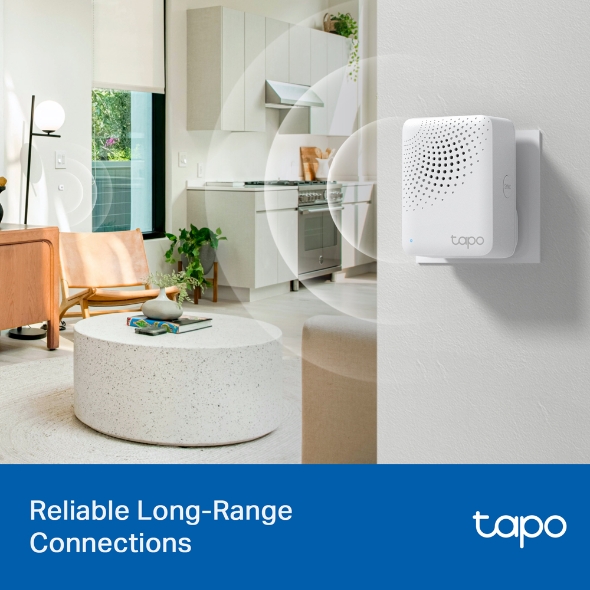
Tapo H100- Reliable Long-Range Connections - Keep sub-devices connected at all times through the robust wireless network.
- Low-Power Wireless Protocol - Make connected devices work energy-efficiently, promising longer standby time.
- Smart Alarm - Coordinates with Tapo smart sensors to warn of danger or deter intruders.
- Smart Doorbell - Pair it with Tapo Smart Button to build your smart doorbell system, plus 19 ringtones to choose from.
- Tapo Ecology - Connect with up to 64 smart devices for an immersive and comprehensive smart home experience.
[1] Compared with battery-powered devices using the Wi-Fi protocol.
[2] The terms less-crowed and lower frequency are compared to wireless network systems in the 2.4 GHz band. Data related to coverage and range was obtained from internal laboratories. Actual results may vary according to differences in environment conditions.
[3] Each Tapo Hub can connect up to a maximum of 64 devices. The actual maximum number of devices allowed may vary according to type of device.
Walk You Through Setup Step by Step
-
1
Download and open Tapo App -
2
Tap Plus (+) to add your smart device -
3
Look for your device and connect -
4
Name the device and choose the room it’s in -
5
Congratulations! You’ve now completed the configuration
Specifications
FAQ
- How to update the firmware of the Tapo&Kasa devices on the Tapo App
- How to find the hardware and firmware version of my TP-Link device
- What should I do if I fail to configure a Tapo/Kasa Hub
- How to unlink third-party accounts from your TP-Link ID
- Frequently asked questions about the "Third-Party Compatibility" feature
- Why do I receive a "We Noticed a New Login" email?
- How to create 3D Map in the Tapo App for Pad
- How to use the Home feature and Room feature in the Tapo App
- How secure are Tapo devices?
- How to get the log of Tapo app
Welcome to Our Website! If you stay on our site, we and our third-party partners use cookies, pixels, and other tracking technologies to better understand how you use our site, provide and improve our services, and personalize your experience and ads based on your interests. Learn more in your privacy choices.
Your Privacy Choices
As explained further in our website Privacy Policy, we allow certain advertising partners to collect information from our website through cookies and similar technologies to deliver ads which are more relevant to you, and assist us with advertising-related analytics (e.g., measuring ad performance, optimizing our ad campaigns). This may be considered "selling" or "sharing”/disclosure of personal data for “targeted advertising” as defined by certain U.S. state laws. To opt out of these activities, press “Opt Out” below. If the toggle below for “Targeted Advertising and ‘Sale’ Cookies” is to the left, you are already opted out and you can close these preferences.
Please note that your choice will apply only to your current device/browser. You must indicate your choice on each device and browser you use to access our website. If you clear your cookies or your browser is set to do so, you must opt out again.
Necessary Cookies
These cookies are necessary for the website to function and cannot be switched off.
Tapo
JSESSIONID, tapo_privacy_base, tapo_privacy_marketing,tapo_top-banner, tapo_popup-right-bottom, tapo_popup-right-middle, tapo_popup-center, tapo_popup-bottom
Youtube
id, VISITOR_INFO1_LIVE, LOGIN_INFO, SIDCC, SAPISID, APISID, SSID, SID, YSC, __Secure-1PSID, __Secure-1PAPISID, __Secure-1PSIDCC, __Secure-3PSID, __Secure-3PAPISID, __Secure-3PSIDCC, 1P_JAR, AEC, NID, OTZ
Targeted Advertising and “Sale” Cookies
These cookies allow targeted ads or the “sale” of personal data (toggle to the left to opt out).
Analytics cookies enable us to analyze your activities on our and other websites in order to improve and adapt the functionality of our website and our ad campaigns.
Advertising cookies can be set through our website by our advertising partners in order to create a profile of your interests and to show you relevant advertisements on other websites.
Google Analytics & Google Tag Manager & Google Optimize
_gid, _ga_<container-id>, _ga, _gat_gtag_<container-id>
Crazy Egg
cebsp_, _ce.s, _ce.clock_data, _ce.clock_event, cebs